
Views: 0 Author: Site Editor Publish Time: 2026-05-19 Origin: Site


Executive Summary: In professional audio setups, it’s common to have an amplifier that greatly exceeds the power rating of a speaker. The key to safety is proper configuration, not simply matching wattage. This guide shows how to use a powerful 4‑channel AT10000Q amp with a 12″ MF12 speaker (350W RMS, 8Ω) without damage. We’ll cover specs, headroom guidelines, voltage-clip limiter (VCL) calculations, DIP switch settings, and a step-by-step checklist to protect your speakers while achieving clean, high-performance sound.
· Amplifier (AT10000Q): A 4‑channel Class TD pro amp (Ascsonic/FP10000Q). It delivers 1350W per channel at 8Ω. Each channel has built-in limiters to prevent distortion and protect connected speakers.
· Speaker (MF12 12″ full-range): Rated 350W RMS at 8Ω (full range).
Even though the AT10000Q is vastly more powerful (up to ~1350W vs. 350W), this is not inherently dangerous if you provide the speaker with a safe limit. Extra amplifier headroom is desirable for clean sound; the risk comes from uncontrolled clipping or over-driving.
Professionals often select an amp that is about 1.2×–1.5× the speaker’s RMS rating to ensure headroom[3]. For a 350W speaker, that suggests roughly 420–525W per channel. In our example, we target 420W (350W×1.2). The AT10000Q can be safely tamed using its voltage-limiter settings.
Using a more powerful amp can actually improve audio quality:
· Cleaner sound: More headroom means less chance of clipping, which causes harsh distortion.
· Better dynamics: The amp can handle music peaks without strain.
· Improved bass control: High-current capability gives tighter bass response.
· Protection: Built-in limiters (as in the AT10000Q) help guard speakers.
The danger is when the amp is misconfigured. A tiny speaker can still be destroyed if the amp clips badly. That’s why we use voltage limiting, not just turning down the gain knob.
1. Verify Equipment: Confirm the AT10000Q amp (4×1350W @8Ω) and the MF12 speaker (350W RMS, 8Ω).
2. Disable Bridge Mode: Ensure BRIDGE mode is OFF (bridge mode would double voltage and power). We only need standard stereo/channel mode for one speaker.
3. Calculate Safe Power: Choose an amp output near 420W for 350W speakers (≈1.2×RMS). More headroom (1.5×) is okay, but 1.2× is conservative.
4. Use VCL Formula: Compute the voltage to feed ~420W into 8Ω:
For P=420W, R=8Ω: . (This formula is standard for converting power to peak voltage.)
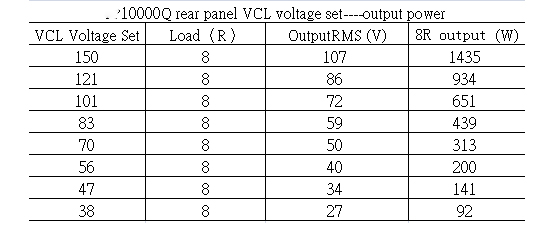
5. Set DIP Switch (VCL): On the amp’s rear panel, find the VCL (Voltage Clip Limiter) DIP switches. Set the limiter to the nearest available value. For ~81V, choose 83V (a factory option). Ascsonic AT10000Q manual lists 83V as one of eight discrete VCL settings.
6. Select Mode (Hard/Soft): Choose Soft VCL mode for full-range speakers (Hard mode is for subwoofers).
7. Connect and Test: Hook up the speaker. Power up gently and play normal audio. Check the VPL indicator (voltage peak limiter) – it should rarely if ever light, indicating no clipping. If it blinks, lower the VCL setting.
The AT10000Q delivers 1350W per channel at 8Ω. Use its rear-panel DIP switches to set voltage limits.
A quick comparison table of amp vs. speaker guidelines:
Speaker RMS Power | Speaker Impedance | Suggested Amp Output (per channel) | Notes |
250W | 8Ω | ~300–375W (1.2×–1.5×) | Extra headroom for clean sound |
350W | 8Ω | ~420–525W | Our example: use 420W (1.2×) |
500W | 8Ω | ~600–750W | |
750W | 8Ω | ~900–1125W |
This follows the rule of thumb: amp power = 1.2–1.5× speaker RMS. The amp can exceed this (the AT10000Q is 1350W) but we apply the voltage limiter to effectively cap it.
Professional amps often provide a Voltage Peak Limiter (VPL/VCL) setting. The Lab.gruppen manuals explain that VPL values are in volts peak. To convert to RMS voltage: . Power into an 8Ω load is .
Using our 420W target:
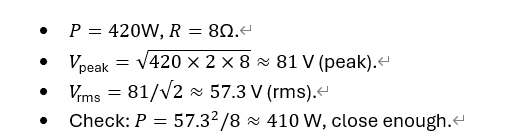
We set the limiter to 83V peak (rms ≈59V) to be safe. The AT10000Q (like its Lab.gruppen cousin) has preset VCL options
Voltage-to-Power Chart (Selectable VCL):
Pros:
· Clean Sound: Plenty of reserve headroom means less distortion and clipping
· Dynamic Range: Able to handle transients and bass with ease.
· Protection: Built-in limiters and soft-start circuits (like in AT10000Q) prevent overloads.
· Efficiency: Class-TD design yields high output with low heat.
Cons:
· Complex Setup: Must configure limiters/DSP correctly.
· Potential Waste: Much of the amp’s capacity remains unused.
· Cost: Higher power amps often cost more.
· Risk if Misused: If you ignore the limiter and drive the amp hard, you can blow the speaker.
The key is to let the amp’s protection features do their job. As LEA Pro notes, limiters ensure the signal “cannot exceed a specific range,” protecting speakers from damage.
· Leaving Bridge Mode On: This doubles voltage and power – dangerous for an 8Ω speaker.
· No Limiter Adjustment: Simply lowering gain is not enough; always set the amplifier’s voltage limiter to match speaker power.
· Ignoring Speaker Ratings: Remember that speaker power ratings are not guarantees. Even a “150W speaker” can be blown by a lower-power amp if misdriven.
· Clipping the Amp: Pushing the amp into hard clipping will generate very hot distorted waves that overheat voice coils.
· Incorrect Impedance: Don’t connect the wrong number of speakers or short circuits; the AT10000Q has short/low-Z protection.
Always verify cables, impedance, and monitor clipping LEDs. If the amp’s CPL (current) or VPL LED lights up, reduce output or raise the limiter.
Q: Why not just use a smaller 500W amp instead?
A: A more powerful amp with headroom often sounds better. Using the AT10000Q allows flexibility for larger setups. With proper limiter settings, there’s no harm in using its extra power.
Q: Can I use any formula for VCL?
A: The formula (or equivalently ) is generally correct. Always use peak voltage for DIP settings.
Q: How do I choose Soft vs. Hard mode?
A: In the AT/FP series, Soft mode is for full-range and HF drivers, Hard mode for subwoofers (for "optimal operation").
Q: What if I don’t have DIP switches (DSP amp)?
A: Modern DSP amps let you enter a voltage limiter value directly. The same calculation applies. Always match the final peak voltage to your speaker’s safe power.
Q: Are there charts for other speaker ratings?
A: You can scale the above chart. For example, at 4Ω, power doubles. Many manufacturers publish voltage-to-power charts. The principle remains: set voltage ≈ √(P×2×R).
For more detailed support, feel free to contact us or consult our technical resources. We can provide full voltage-to-power tables and custom recommendations for any speaker setup. Follow our blog for more pro audio tips and step-by-step setup guides.


